
Computer-delivered IELTS
Computer-based IELTS preparation: how the CD test really works and how to practise for it
Prepare for computer-delivered IELTS properly: what the screen actually shows, where paper habits fail, and how to train typing, navigation and timing.
CD IELTS Prep Editorial Team · Published 22 August 2026 · Updated 30 August 2026 · 7 min read
Original, independent practice guidance. CD IELTS Prep is not an official IELTS provider; confirm current booking and test-day requirements with your test centre.
Computer-delivered IELTS is the same test as paper-based IELTS: the same question types, the same band scale, the same examiners for Writing and Speaking. What changes is the medium — and the medium changes how marks are won and lost. Candidates who prepare on paper and sit the test on a computer routinely lose time to unfamiliar navigation, mistype answers they knew, and misjudge essay length because they are used to counting handwritten lines.
Computer-based IELTS preparation therefore has two jobs: the English, and the interface. This guide covers the second job, because it is the one most study plans skip.
What the test looks like on screen
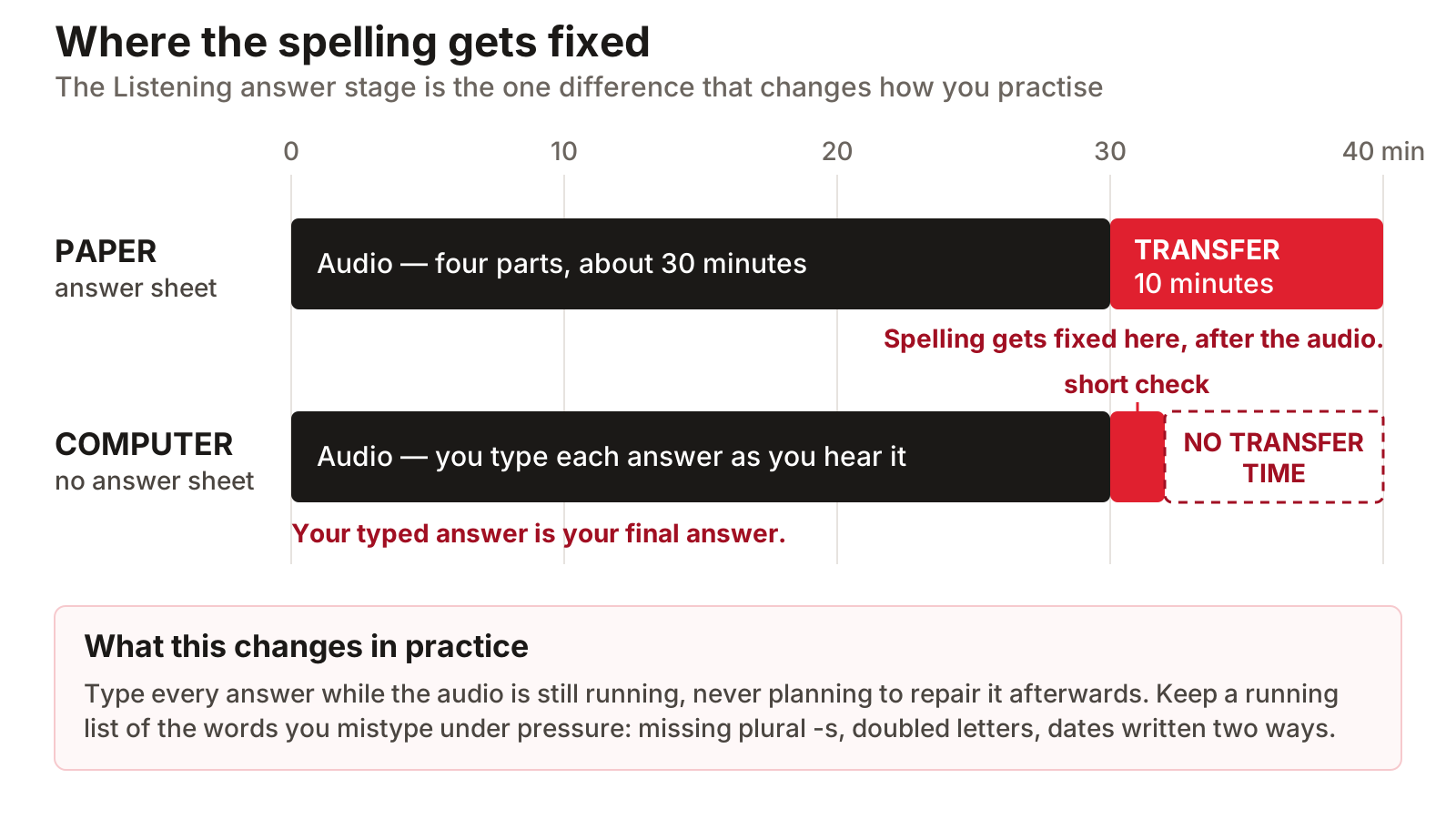
- Listening: questions appear on screen and you type or select answers directly — there is no separate answer sheet, so you get a short check period at the end instead of the paper test's 10-minute transfer time.
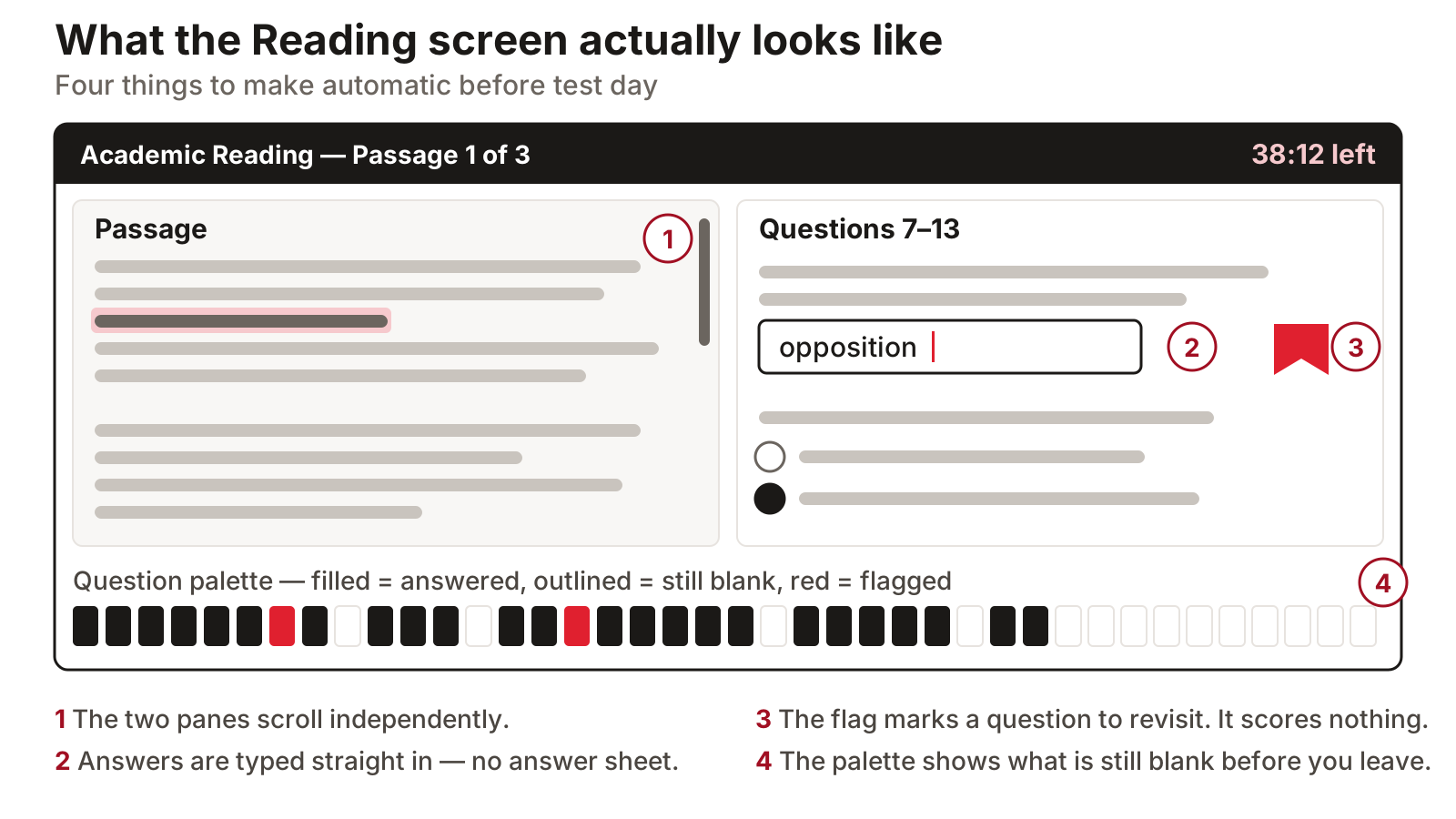
- Reading: the passage sits on one side of the screen and the questions on the other, with both panes scrolling independently.
- Writing: you type both tasks in a plain text box with a live word count, and cut, copy and paste work inside the answer area.
- Navigation: a question palette shows every question number, marks which are answered, and lets you jump anywhere in the section; a flag button marks questions to revisit.
- Speaking: unchanged — a live conversation with an examiner, not a recording into a microphone.
The differences that actually affect your score
The Listening transfer time is the biggest structural difference. On paper you get 10 minutes at the end to copy answers across, which many candidates use to fix spelling. On the computer there is no transfer stage — your typed answer is your final answer — so spelling discipline has to happen while the audio plays, not afterwards.
In Writing, typing rewards editors. Reordering paragraphs, fixing a weak opening sentence, and deleting a sentence that drifts off topic are all cheap operations on a keyboard and expensive ones in pen. If you can type at a reasonable speed, the computer version gives you more genuine revising time inside the same 60 minutes. If you type slowly, that advantage inverts — which you should find out in practice, not on test day.
In Reading, nothing replaces the pencil habits: you cannot circle words in the passage margin. The CD test offers highlighting and a note tool instead, and using them needs to become automatic before the real sitting. Two rules keep them useful. Highlight one phrase per question — the phrase that actually decides the answer — because a paragraph highlighted end to end marks nothing at all. And save the note tool for matching headings: three words naming what a paragraph does ('questions earlier data', 'proposes a fix') give you a map you can answer from without rereading.
Typing your drafts? Check one against the criteria before you keep writing more.
Open the writing checkerHow to practise: interface skills as a checklist
- Do all timed practice on screen once you are within a month of the test — paper practice stops transferring exactly when timing starts to matter.
- Type every Listening answer during the audio and never rely on fixing it later; keep a running list of words you mistype under pressure.
- Practise split-screen reading: skim the passage pane first, then work question by question without losing your scroll position.
- Draft Task 2 with a two-minute typed plan at the top of the answer box, then delete it before submitting — a trick that is only possible on the computer.
- Use the question palette at the end of every section to confirm nothing is blank; an unanswered question can never score.
- Rehearse with the on-screen timer visible until the countdown stops raising your pulse.
Rehearse in a faithful computer-delivered interface with the real timing.
Start a CD mock testA two-week interface conversion plan
If you have prepared on paper and your computer-delivered test is close, two focused weeks are enough to convert. Days one to three: untimed on-screen work in each module, purely to learn where everything is — the palette, the flag, the highlighter, the word count. Days four to seven: timed single sections on screen, with a note after each about what the interface cost you (a mistyped answer, a lost scroll position, time spent hunting for a button). Week two: alternate full timed modules with review days, finishing with two complete mocks in the final four days. By the second mock, the interface should have become invisible — you should be thinking about the questions, not the screen. If it has not, the remaining friction points are your revision list for the last days.
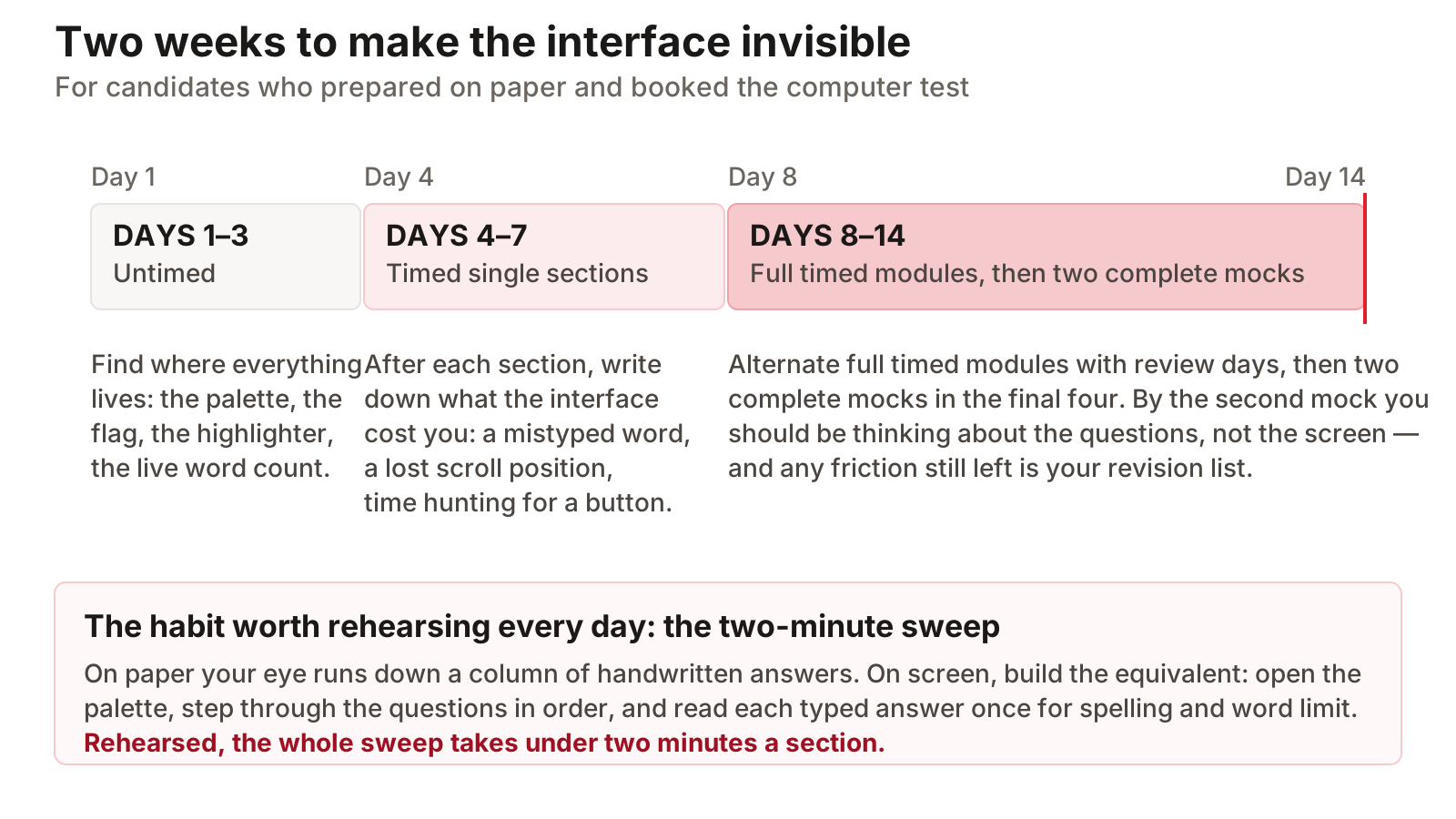
One habit deserves special attention: keyboard-only checking. On paper, your eye runs down a column of handwritten answers naturally. On screen, build the equivalent — open the palette, step through the questions in order, and read each typed answer once for spelling and word limits. Rehearsed, the full sweep takes under two minutes per section and catches the typing slips that on-paper preparation never taught you to look for.
Choosing computer or paper
If typing feels natural, computer-delivered is usually the better choice: results are typically released within a few days rather than about two weeks, test dates are more frequent in most cities, and the Writing edit-ability is a real advantage. Choose paper only if handwriting is genuinely faster and more accurate for you — and if you do, be consistent and practise on paper too. The worst outcome is preparing in one medium and performing in the other.
Common questions
Is computer-delivered IELTS easier than paper-based?
The content, scoring and band descriptors are identical. Any difference in your result comes from fit: fast typists and screen readers tend to do slightly better on the computer, strong handwriters on paper.
Do I need fast typing for the computer test?
You need comfortable, accurate typing rather than speed for its own sake. Around 30 words per minute with few errors is enough to finish both Writing tasks with revising time; test yourself early so you know.
Is the Speaking test done on the computer?
No. Speaking remains a live, face-to-face conversation with a certified examiner, sometimes delivered by video call, whichever version of the test you book.
Create a free account to save attempts and track your module scores over time.
Register free